by


How To Do Content Writing on Phone: 3 Tips, Tricks, and Mistakes to Avoid

10/01/2026
If you’re here, there’s a high chance you just watched someone talk about content writing and the life changing amounts of money you can make with it. You’re thinking of going into it, but you realize that you don’t have a laptop.
Now you’re wondering if your dream of becoming a highly paid content writer has died.
You’re asking “can I do content writing on my phone?”
The short answer is yes, you can write content from start to finish with only your mobile phone.
But that answer isn’t helpful if you don’t know how to do it, the apps to use, and mistakes to avoid.
In this article, I’ll show you how to write content with your phone, mistakes to avoid, and share tips on making money with content writing.
But first…
Why listen to me?
I’m Tari Yousuo, a Digital Marketer, SEO Specialist, and Content Writer for Tech brands.
Although I now have a PC and make decent sums of money each month, that’s not how I started. I started with scraps, borrowed PCs, and looked for every free tool I could find.
Because I didn’t have everything I needed, I found creative ways to solve problems. Writing content with my phone is one of those problems I solved. No matter the type of content writing you’re into, this will help you.
Content writing on phone overview
I’m assuming you already know what content writing is and the types of content writing. If you don’t, read this post on content writing for beginners.
Why you may need to do content writing on phone
No PC
The main reason you may need to write content on your phone is that you don’t have a laptop/PC. But instead of making excuses, you’ve taken the bold step to work with what you have.
Some other reasons
Your PC suddenly went bad: Sometimes life happens. Your PC could crash, your charger could blow up. But that shouldn’t stop you from writing.
The power supply is down: If you live in a third-world country like me, you know how erratic power supply can be. In such moments when you have to deliver work to clients against tight deadlines, your phone can save the day.
Write quick drafts: You may need to write something quickly and don’t have access to your laptop. Maybe an idea popped out of the blue. You don’t have to lose it. You can simply jot it on your mobile device.
Benefits of writing content on your mobile phone
Start content writing without any money.
One thing stopping many people from learning a digital skill is that they do not have access to a laptop. Thankfully content writing is different. Because you can write with only your phone, you don’t need any money to start content writing. There are many free courses to guide you. All you need is a willingness to learn and put in the work.
Write faster
Some people type faster on their mobile phones. I’m one of them. If you’re like us, you can finish your work faster by writing on your phone and editing on your laptop.
Conserve power.
Generally, mobile phone batteries last longer than laptop batteries.
If you’re in a situation where power supply is an issue, you can write with your phone and do final edits/publishing on your laptop.
Save data
Laptops consume more data than mobile phones. Sometimes an update or background process can consume your data. Mobile phones use less data and it’s easier to control how you use data on mobile.
Ease
Besides the other benefits, it’s also easier to write with a mobile phone than with a PC. I could be lying on my bed and typing something that’d pay me more than the minimum wage. With a PC, you have to get a table and a chair, sit upright, and lock in.
Challenges of writing content with smartphones
As with everything, writing with a phone also has its disadvantages. Some challenges include:
Layout and Formatting
Things look different on desktops/laptops and on mobiles. Getting the layout and formatting right can be challenging, especially when you’re mainly writing for websites, not social media. You’d have to squint your eyes, struggle with certain buttons/actions, struggle to copy and paste things. Image quality may look great on mobile yet bad on desktops.
Integrations and Tools
If you’re a serious content writer, you’d have to use tools and some browser extensions for keyword research, audience and topic research, writing, editing, publishing, content analytics, and reporting. The tools may not be available on mobile or may be more challenging to use because the layout on mobile isn’t as simple as on PCs.
Publishing
Publishing content on web platforms like WordPress and Medium using mobile phones can be a hassle. It still boils down to layout issues. Mobile layout often is too small or doesn’t include some features.
How to do content writing with your phone
To write content on your phone, here’s what you need to do.
Step 1: Install Google Docs
Google Docs is the best app for content writing both on mobile and desktop. It’s no surprise it has over 1 billion monthly active users. Simply go to your App Store and search for Google Docs.
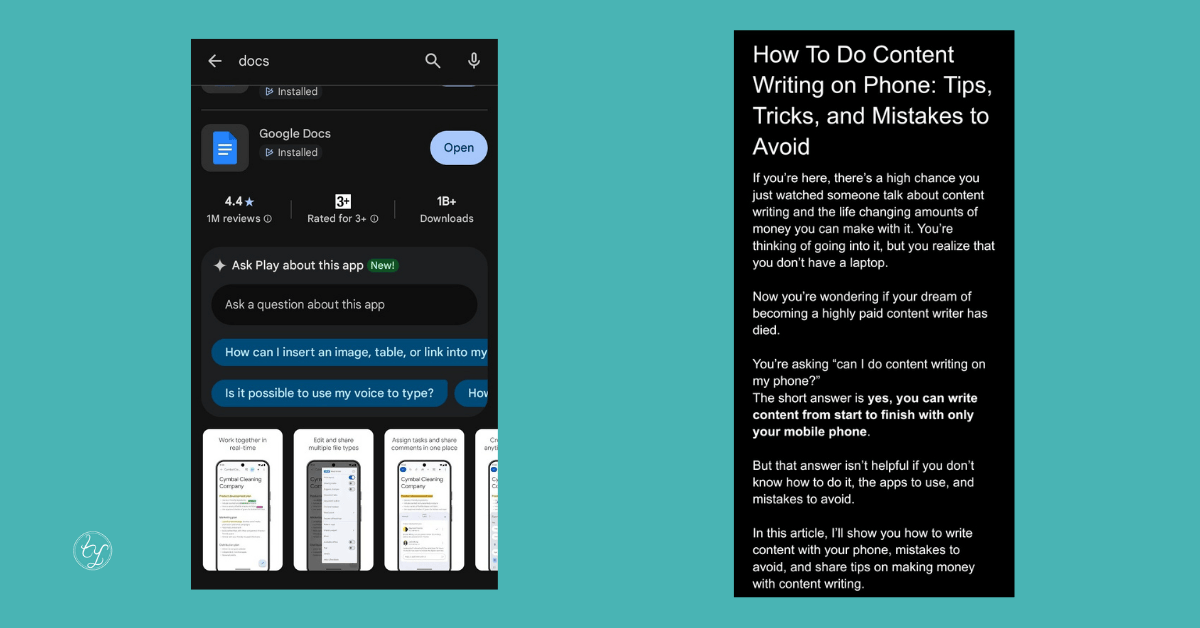
After installing it, you’re good to go.
Some of the benefits of Google Docs is that it autosaves your work.
It’s easy to work with others on the same piece of content. You can see the version history, showing all changes and who made the changes.
Also, when you eventually get a PC, it’s easy to work on the same document from any device. You can start writing on your phone and easily continue on your laptop without having to download/send any file.
The best part, Google Docs is absolutely free.
Step 2: Write your content
I assume you already know how to write content and are just thinking of how to do it on your phone.
The exact step by step process depends on the type of content you’re writing.
Writing for social media is different from writing for a blog or email newsletter.
If you don’t know how to write content that pays, get my free course.
Generally, here’s what the writing process may look like in 8 steps.
- Know your audience, their pains, and the problems they’re trying to solve
- Do research to find topics they care about so you don’t waste your time
- Pick a topic and a goal.
- Create an outline so you don’t drift away from your goal.
- Write with your goal in mind.
- Edit the content for clarity.
- Format and style the content to fit the publishing platform
- Publish
Step 3: Edit your content
After writing, format your content to fit the platform.
This is easy if you’re writing primarily for social media, since social platforms are mobile-first.
But if you’re publishing on a web platform like a blog, view in print (desktop) layout to see how it would look.
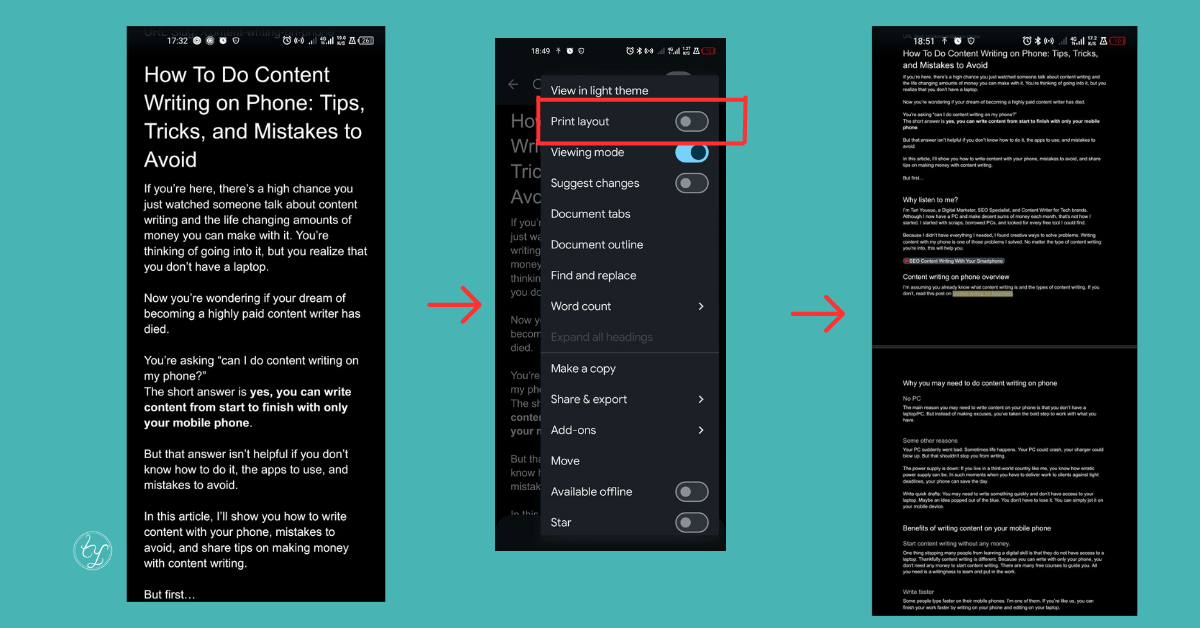
Then adjust the content so it looks good on desktops.
If you’re into SEO content writing, ensure you use subheadings, add internal and external links, and use your keyword in strategic places like the main heading, some subheadings, the first and last paragraphs of your article.
Step 4: Submit/Publish content
If you’re writing for a client, you can either download and send the content to your client or share the Google Docs link with them.
To download, simply click the 3 dot icon at the top right, select share & export, then click send a copy. Select the format, then select the app through which you want to send the file (whether Gmail or WhatsApp, etc.)
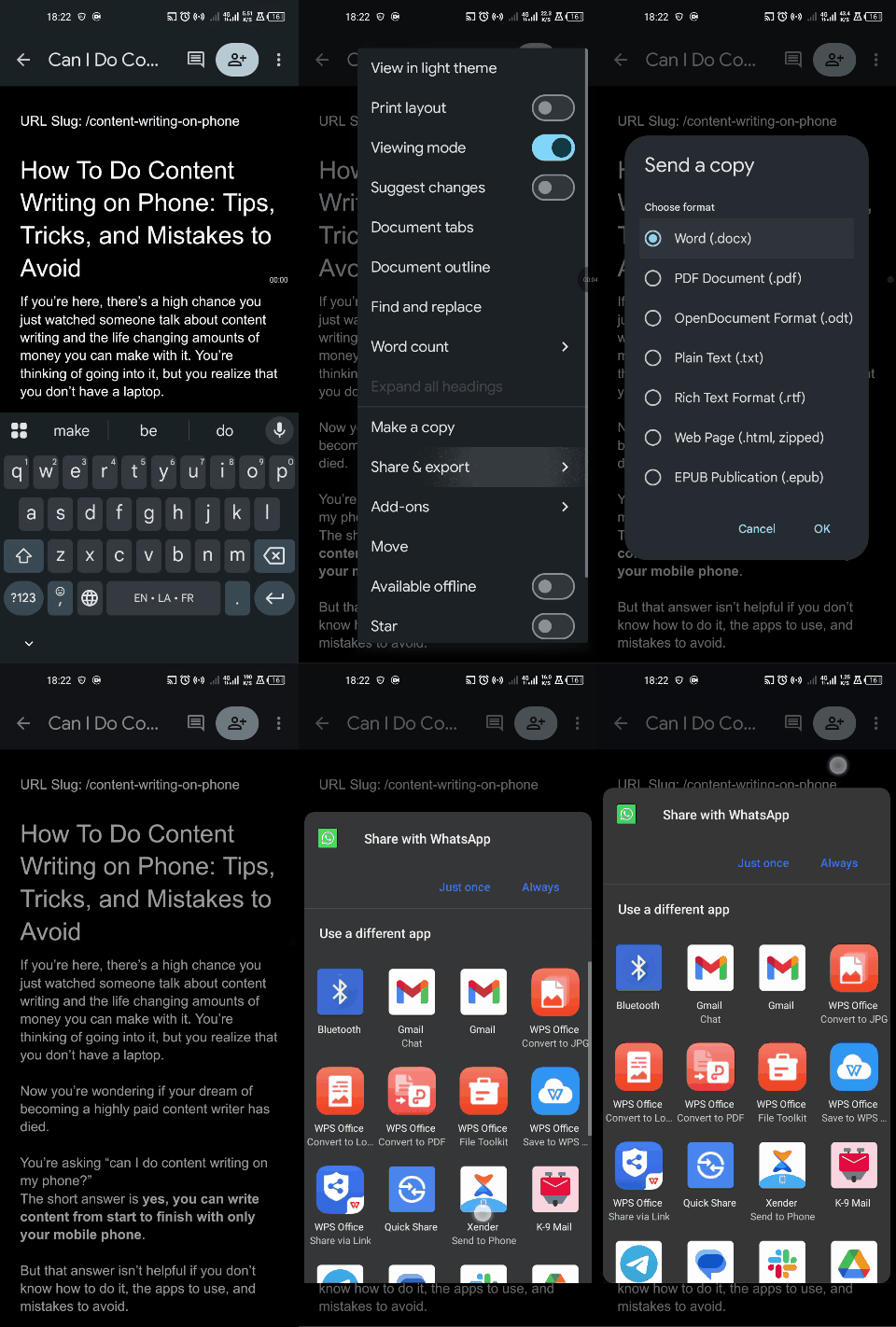
If you want to share the link instead (which is better for most clients)
Click the share icon, under manage access click not shared, under general access, click change, then change from restricted to anyone with the link. Select commenter if you want the person you’re sharing the file with to only view and comment. Select editor if you want your client to be able to edit the file themselves.
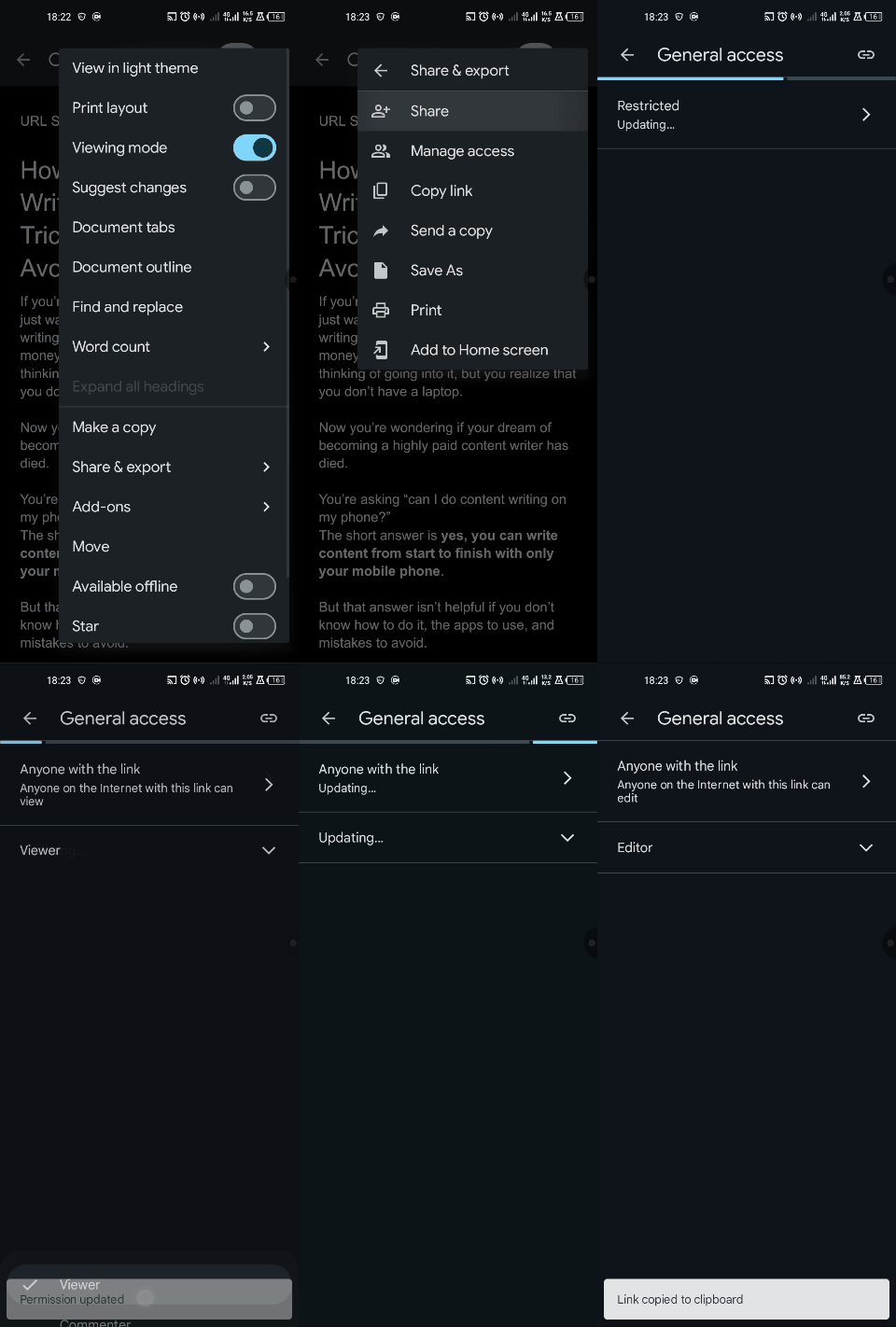
But if you’re writing for yourself, you can simply copy and paste the content into your publishing platform. Many platforms retain the formatting if you copy your article from Google Docs.
Important tips to keep in mind when writing with your phone
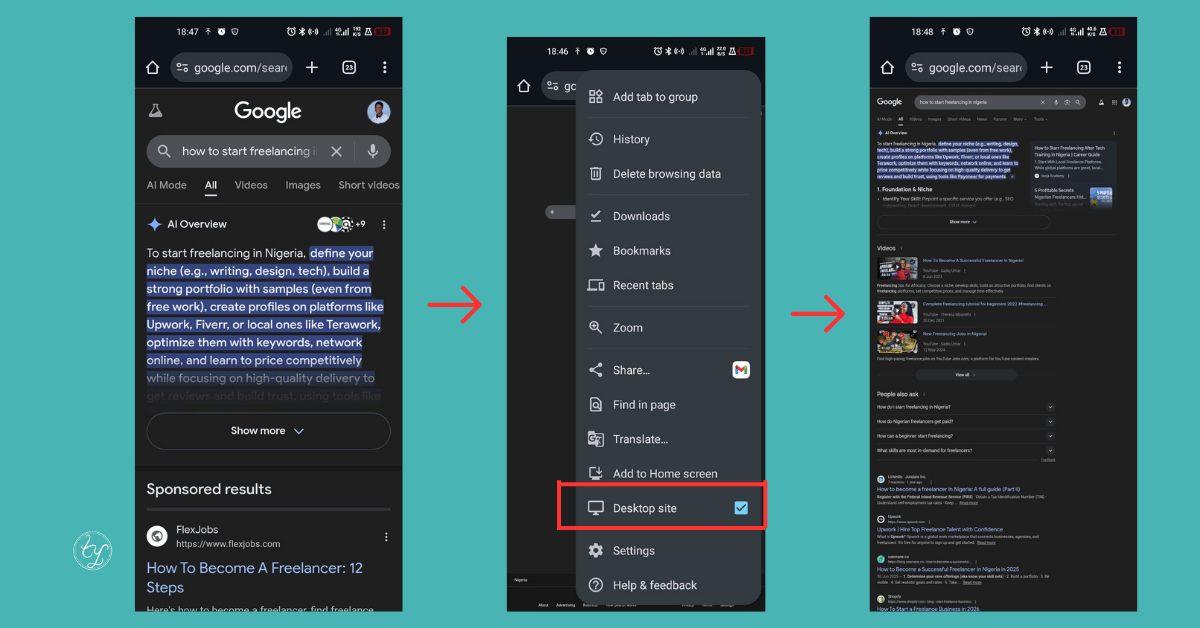
1. Use desktop mode on Google Chrome
To get the best out of different tools and even Google search, use Google chrome to browse and ensure you turn on desktop mode. That way, your phone will serve as a desktop, helping you use all the features of the tool/platform.
2. Always preview in print layout before sending
Especially if you’re writing to publish on a blog or website like Ahrefs that is intended for desktop users. This helps you see your article the same way users will see it.
3. Use high quality images
Low quality images can sometimes look good on mobile because of the smaller screen size. If you add images to your article, ensure the quality is good enough on desktops too.
Don’t wait for luck to shine on you
Using only your phone for content writing isn’t easy. Especially for research, editing, publishing, and analytics. But that shouldn’t stop you from starting your content writing journey. If you have only a mobile phone, you have all you need to start.
Pick a niche, select a few topics, and write.
When you make your first few bucks, you can get a PC and take on more complex projects.
Start making money with content writing without wasting time
If you’d love to skip trial and error, know what’s working now, and start making money with content writing faster than you would’ve done on your own, this is for you.
Free courses are great – I give them away too.
But you could be moving around in circles if you don’t have a clear guide.
Many free courses show you the roadmap.
They say to go from 0 to 100,000, do this and that and that.
The best ones take it a step further to show you how to go from point A to point B.
But they all lack one key ingredient, personalized feedback.
They don’t show you the ditches along the way and don’t tell you how to come out of one if you eventually fall into it (yes, you’ll encounter bumps along the way)
That’s where a system and mentorship comes into play.
If you want to skip the line and learn directly from someone who isn’t just teaching but also making money from content writing, get my PS5 system.
Get my Premium SEO Writing System
Inside, I’ll show you how to go from 0 to 6 figures (naira) in 6 months or less.
Here’s what you’ll get:
- Step by step videos showing you how to write – recorded by me
- An ebook guide to supplement the videos – for quick reference
- My secret client acquisition frameworks – not found anywhere
- Your own website (.com.ng) – show up like a professional
- Free hosting for six months – this alone costs me $30
In addition, you’ll also get
> Biweekly live sessions
> Article and portfolio reviews
> Resume, client pitch and job strategies
> Mentorship from a 7-figure content writer
> Access to a private community of winners
